Impressions are the first metric that tells you whether LinkedIn is distributing your content or not.
Before anyone engages, follows, or reaches out, they have to see the post first. That visibility is measured through impressions.
I built Supergrow to help professionals show up consistently on LinkedIn. And the one metric that tells me immediately whether a content system is working is impression trend, not follower count, not likes.
This guide covers what are impressions on LinkedIn, how they work in 2026, what good looks like, and how to grow them.
What are impressions on LinkedIn?
A LinkedIn impression is recorded every time your content appears on a signed-in member's screen.
It does not matter whether they stop to read it, react to it, or scroll straight past. The moment your post loads on their screen in their feed, on your profile, in search results, or in a notification — that counts as one impression.
How LinkedIn Counts an Impression?
LinkedIn uses a specific technical threshold to register an impression: your content must be at least 50% visible on screen for at least 300 milliseconds on a signed-in member's device.
That is a deliberately low bar. A quick scroll past your post registers. A brief pause registers. The platform is measuring exposure, not attention.
A few mechanics worth knowing:
-
The same person can generate multiple impressions from the same post — if they see it in their feed on Tuesday and visit your profile on Wednesday, that is two impressions
-
Impressions reset per post — your previous post's count has no effect on the next
-
Your own views as the post creator are excluded from your impression count
-
Impressions appear in four places: your main feed, profile visits, LinkedIn search results, and activity notifications
LinkedIn Impressions vs Views vs Reach vs Engagement
These 4 metrics are frequently confused. Each measures something different and signals something different about content performance.
| Metric | What it measures | How it is counted | What it tells you |
|---|---|---|---|
| Impressions | Total times content appears on screen | Every appearance, including repeats by the same person | How far LinkedIn is distributing your content |
| Views | Active attention on content | Video: 2+ seconds at 50% visible. Article: opened and loaded | Whether people are genuinely stopping to consume |
| Reach | Unique users who saw content | Each person counted once regardless of repeat views | How many different people your content touched |
| Engagement | Interactions with content | Likes, comments, shares, clicks, reposts | Whether content is resonating with the audience it reached |
3 practical implications from the above table:
A healthy impressions-to-reach ratio for most feed posts is roughly 2:1. If your ratio is significantly higher — say 5:1 or 10:1 — the same small group is seeing your content repeatedly rather than it reaching new people.
High impressions with low engagement signal the content is being distributed but not resonating. The distribution is working. The content is not.
Low impressions with high engagement signal the opposite. The content resonates with everyone who sees it, but LinkedIn is not pushing it far enough. The fix is distribution, not content quality.
Types of LinkedIn Impressions:
1. Organic impressions are generated without any advertising spend. LinkedIn's algorithm distributes your content naturally based on relevance, engagement signals, and connection strength. These come from your feed, profile visits, hashtag feeds, search results, and when connections share your posts.
Personal profiles generate 2.75x as many organic impressions as company pages. If you are building a LinkedIn presence, posting from a personal profile consistently outperforms posting from a brand page in terms of raw organic reach.
2. Viral impressions are generated when someone shares or reposts your content. Each time their network sees the shared post, that view adds to your original impression count. A single repost from a well-connected account can significantly multiply your reach. Viral impressions are where genuine scale happens for organic content.
Why LinkedIn Impressions Matter?
Most people check impressions to validate a post. That is not what the metric is for.
Impressions are a diagnostic signal. They surface what is working in your content system and what is not before any other metric does. The number alone tells you little. The combination of impressions with engagement tells you everything.
1. High impressions, low engagement: LinkedIn is distributing your content. People are seeing it. They are not stopping. The problem is the message, not the distribution.
2. Low impressions, high engagement: Everyone who sees the post responds to it. The content is working. The algorithm is not amplifying it. The problem is the first-hour strategy, not the content.
3. Declining impression trend week over week: This is the signal most creators miss entirely. Engagement drops follow impression drops, never the other way around. A declining trend is the earliest indicator that something in your system has broken. Catch it here before it shows up in your follower count.
For B2B professionals, impressions carry a significance that goes beyond content performance. /linkedin-statistics
95% of decision-makers say thought leadership directly influences their purchasing decisions. 75% went on to research a product they had never considered before, simply because content appeared in front of them. That pipeline starts with an impression long before any direct contact happens.
The algorithm compounds this over time. Consistent impression performance trains LinkedIn's distribution model to surface your future posts more widely. Inconsistency resets it.
What Is a Good Number of LinkedIn Impressions in 2026?
The honest answer: it depends on your page size and the format you use.
Most benchmark guides give you a single number. That number is meaningless without context. Impressions vary significantly based on your follower count, your content format, and whether you are posting from a personal profile or a company page.
Here is what the data actually confirms. From an analysis of 1.3M LinkedIn business posts across 16,645 pages.
Average impressions per post: by format and company page size
| Followers | Native document | Multi-image | Video | Text | Poll |
|---|---|---|---|---|---|
| 1K–5K | 525 | 490 | 355 | 300 | 340 |
| 5K–10K | 550 | 1,210 | 590 | 425 | 530 |
| 10K–50K | 1,150 | 1,850 | 1,420 | 845 | 1,255 |
| 50K–100K | 2,600 | 4,320 | 2,390 | 1,695 | 4,845 |
Two patterns stand out in this data.
For pages under 50K followers, multi-image posts consistently generate the highest number of impressions per post across every size tier.
For pages with over 50K followers, polls become the top format for generating impressions at scale.
Average engagement rate: by format (LinkedIn impressions benchmark 2026)
| Format | Avg engagement rate | Year-over-year |
|---|---|---|
| Native document | 7.00% | +14% |
| Multi-image | 6.45% | Stable |
| Video | 6.00% | +7% |
| Image | 5.30% | +9% |
| Text | 4.50% | +12% |
| Poll | 4.20% | Slight increase |
| Link | 3.25% | Stable |
The platform-wide average engagement rate on LinkedIn currently sits at 5.20% — 8% higher than the previous year.
One critical context point before using these numbers.
These benchmarks cover company pages. Personal profiles generate 2.75x more organic impressions than company pages posting the same content — a consistent finding across platform research. If you are building a personal brand, your impressions ceiling is significantly higher than these page benchmarks suggest.
The second thing these numbers do not tell you is that raw impressions are declining for most accounts.
Analysis of 1.8M LinkedIn posts found average post reach has fallen to 8–12% of followers, down from 15–20% previously. Fewer impressions are reaching more of the right people. Engagement per post is rising even as raw impression counts fall.
The implication: a good number of impressions in 2026 is not an absolute figure. It is a trend moving upward on your own account, with an engagement rate above the platform average for your format. Tracking LinkedIn impressions per post over time, not in isolation, is what gives the benchmark data its real meaning.
How LinkedIn Distributes Impressions: The 2026 Algorithm
Understanding how LinkedIn decides who sees your content and how far it travels changes how you think about every post you publish.
How Does Distribution Actually Work?
When you publish a post, LinkedIn does not show it to your full network. It starts with a small test group. Typically, your most engaged connections, people who recently interacted with similar content, and a random sample of your followers.
LinkedIn's engineering systems narrow hundreds of millions of candidate posts down to roughly 2,000 per user per request before any ranking happens. Your post competes for that shortlist before it ever reaches a feed.
What happens in the first 30 to 60 minutes after publishing determines whether the post expands beyond that initial group or stops there. Strong early signals push it forward. Weak early signals end the distribution.
What LinkedIn Prioritizes Now?
The signal hierarchy has shifted in 2026. Saves and dwell time. How long someone spends reading a post now carries more weight than likes. Comment depth outperforms comment volume. A post with 5 substantive comments consistently outranks one with 50 generic reactions.
This matters because most creators optimize for likes. Likes are now the weakest signal in the distribution model.
The Shift to Relevance-Based Distribution
LinkedIn moved from distributing content based primarily on connection strength to distributing based on topic relevance and expertise signals. LinkedIn calls this 360Brew. A ranking model built on semantic relevance and expertise signals rather than connection proximity.
This is what drove the headline numbers in recent algorithm research. Average post reach is falling to 8–12% of followers, down from 15–20% previously.
The reach is lower. The audience is more targeted. Engagement per post has risen 12–39% during the same period. LinkedIn is trading raw distribution for precision distribution. Fewer people see your content. More of the right people do.
The Link Post Debate
For years, the advice was clear: keep links out of the post body. Put them in the first comment.
That advice is now being challenged by research from 2026. The analysis found that a single external link in the post body reduces median reach by 18.8%. A Q1 2026 analysis of nearly 400,000 posts found that posts containing links performed considerably better than posts without them.
The research is genuinely split. What both studies agree on: the quality of the post surrounding the link determines performance more than the presence of the link itself. A thin post with a link underperforms. A substantive post with a link may not be penalized at all.
How To Increase Impressions On LinkedIn: What Actually Works in 2026
Most advice on growing impressions is additive. Do more things, post more often, use more hashtags. The data does not support that approach. What the data supports is getting a few specific decisions right and doing them consistently.
Choose Format Before You Choose a Topic
Before you write a single word, decide the format. Most creators skip this step. It is the one that matters most.
The analysis shows native documents average a 7% engagement rate, the highest of any format. Multi-image posts generate the deepest raw impressions for pages <50K followers. Polls shift to the top impression format once a page crosses that threshold.
Most creators decide on a topic first and then choose a format. The data suggests the opposite order. Format determines your distribution ceiling before the content is written. A strong idea in the wrong format consistently underperforms a mediocre idea in the right one.
Format also changes the best time to post on LinkedIn. Carousels and document posts perform best at 12pm–2pm and 4pm–6pm. Text posts perform best in the morning window. /best-time-to-post-on-linkedin
Engineer the First Hour — Not Just the Posting Time
Knowing when to post matters. What you do in the first 60 minutes after posting matters more.
Posts that generate early comments, likes, and genuine conversation in the first hour are 4.1x more likely to receive extended algorithmic reach. The algorithm uses that window to determine whether your content warrants broader distribution or should stop with the initial test group.
Dwell time compounds this. Posts generating 11–30 seconds of reading time receive extended distribution. Posts held for 31–60 seconds or more achieve maximum algorithmic reach. The implication: writing content that makes people stop and actually read is not just a quality goal — it is a distribution strategy.
Three actions that engineer this window deliberately:
-
Comment on three to five posts in your network in the 30 minutes before publishing. This signals activity and primes reciprocal engagement when your post goes live.
-
Add a first comment immediately after posting: a question, a key takeaway, or a relevant resource. This extends the post's surface area and keeps early commenters in the thread.
-
Respond to every comment within the first two hours. Reply velocity is a distribution signal. Comments that go unanswered signal to the algorithm that the conversation has ended.
Supergrow handles the second action: scheduling your first comment to publish the moment your post goes live, without requiring you to be online.
Use @Mentions to Import Networks
Tagging a relevant person in a post imports their network into your potential reach pool. When that person engages, their connections see the post. Your distribution expands beyond the people who follow you.
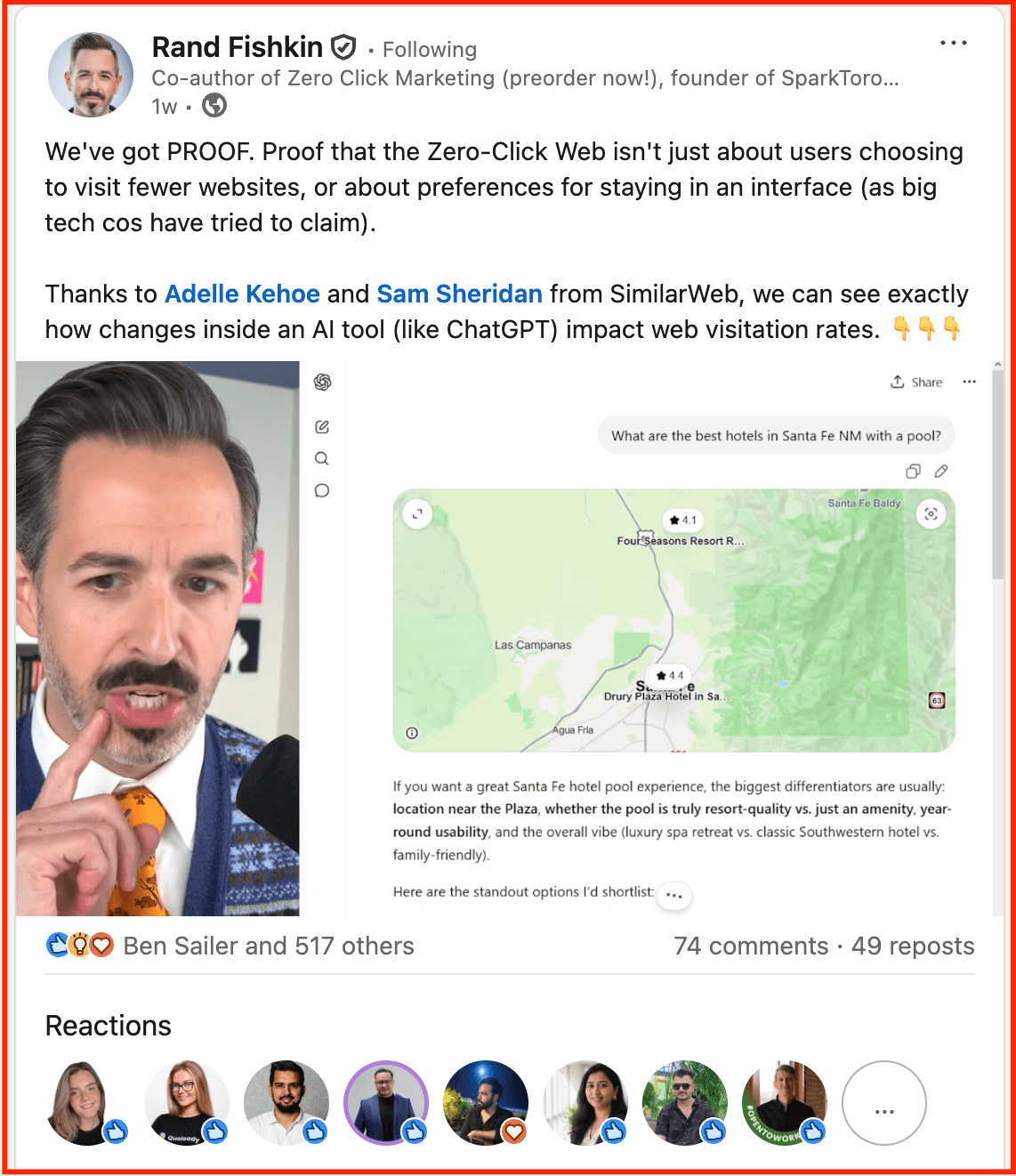
The post above from Rand Fishkin is a precise example of this done right.
He tagged the two SimilarWeb researchers who produced the data he was sharing — Adelle Kehoe and Sam Sheridan. The tags were contextual and earned. Both individuals had a genuine reason to engage. The result: 518 reactions, 74 comments, and 49 reposts. A reach that extended well beyond Fishkin's own network because the tags brought two additional networks into the distribution.
Build a Consistent Posting System — Not a Posting Habit
Consistency on LinkedIn is not about discipline. It is about algorithmic training.
Pages that post at least once per week see 5.6x more follower growth than those posting sporadically. The algorithm picks up on your pattern. Post consistently at the same windows, and it starts anticipating your content; distribution begins before your audience even sees the post. When that pattern breaks even for one or two weeks, the baseline resets. Your next post starts distribution from scratch.
The practical implication: three consistent posts per week at the same windows will outperform 5 sporadic posts regardless of individual content quality. The system rewards predictability.
Supergrow is built to make this effortless. Not just scheduling posts, but helping you create them consistently in the first place. From generating LinkedIn posts to queuing your publishing calendar, the system removes the friction at both ends so consistency becomes structural, not motivational.
Why Your LinkedIn Impressions Are Not Increasing?
If your impressions have plateaued or declined, the cause is almost always one of four structural issues, not content quality.
1. Irregular cadence: The algorithm has no behavioral pattern to learn from. Each post starts distribution from zero.
2. Wrong format for your page size: Native documents and multi-image posts dominate among those with under 50K followers. Polls dominate above. Consistently posting in the wrong format caps your distribution ceiling.
3. No first-hour engagement: The post goes quiet immediately after publishing. The algorithm reads silence as low relevance and stops pushing the content.
4. Declining topic relevance: LinkedIn's relevance-based distribution rewards consistent topic authority. Creators who post across too many unrelated topics see impressions narrow over time as the algorithm struggles to define their expertise signal.
Identify which one of these applies before adding anything new to your LinkedIn content strategy. Fixing the right thing first compounds faster than stacking new tactics on top of a broken foundation. If you are asking why your LinkedIn impressions are dropping, start with these four causes before adding anything new to your strategy.
How to Track Your LinkedIn Post Impressions?
LinkedIn shows you the number. The pattern behind the number is what drives better content decisions.
Finding impressions natively on LinkedIn:
-
Click the impressions count beneath any post to see total impressions, reach, and engagement breakdown
-
For a broader view: LinkedIn Analytics → Posts tab → filter by date range
-
LinkedIn shows total impressions, reach, reactions, comments, shares, and a follower vs non-follower split per post
What LinkedIn does not show: your impression trend over time, which formats are consistently outperforming others, what content elements to replicate, and — critically — how impressions are distributed across your team if multiple people are posting.
Team-wide impression tracking
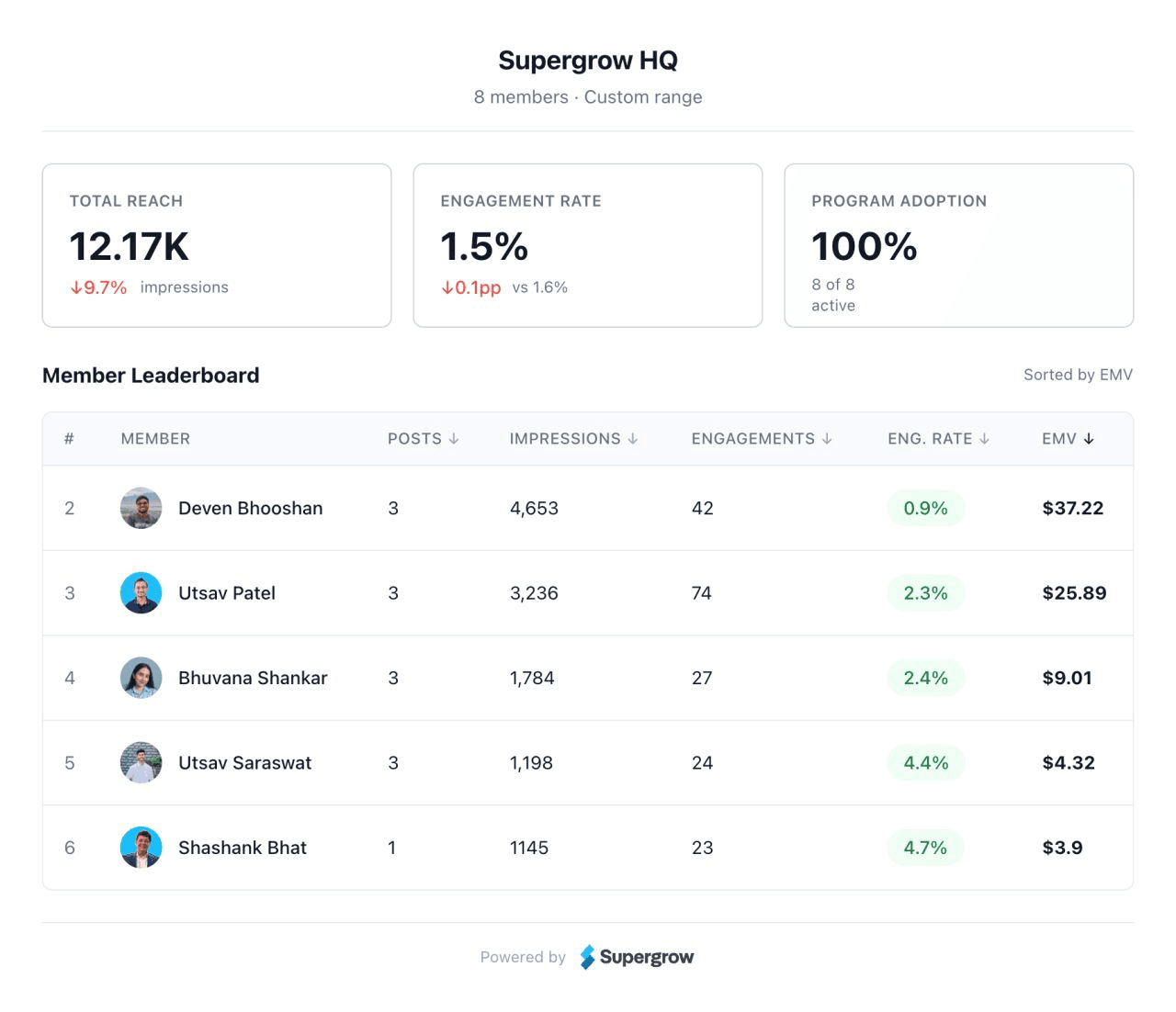
Supergrow's team dashboard surfaces what LinkedIn's native analytics cannot. Total reach across all members in one view, individual impression counts per person, engagement rates side by side, and program adoption all without switching between accounts.
When one member's impressions drop, it shows immediately. When another's engagement rate spikes, the team can learn from it.
Individual post-level impression tracking
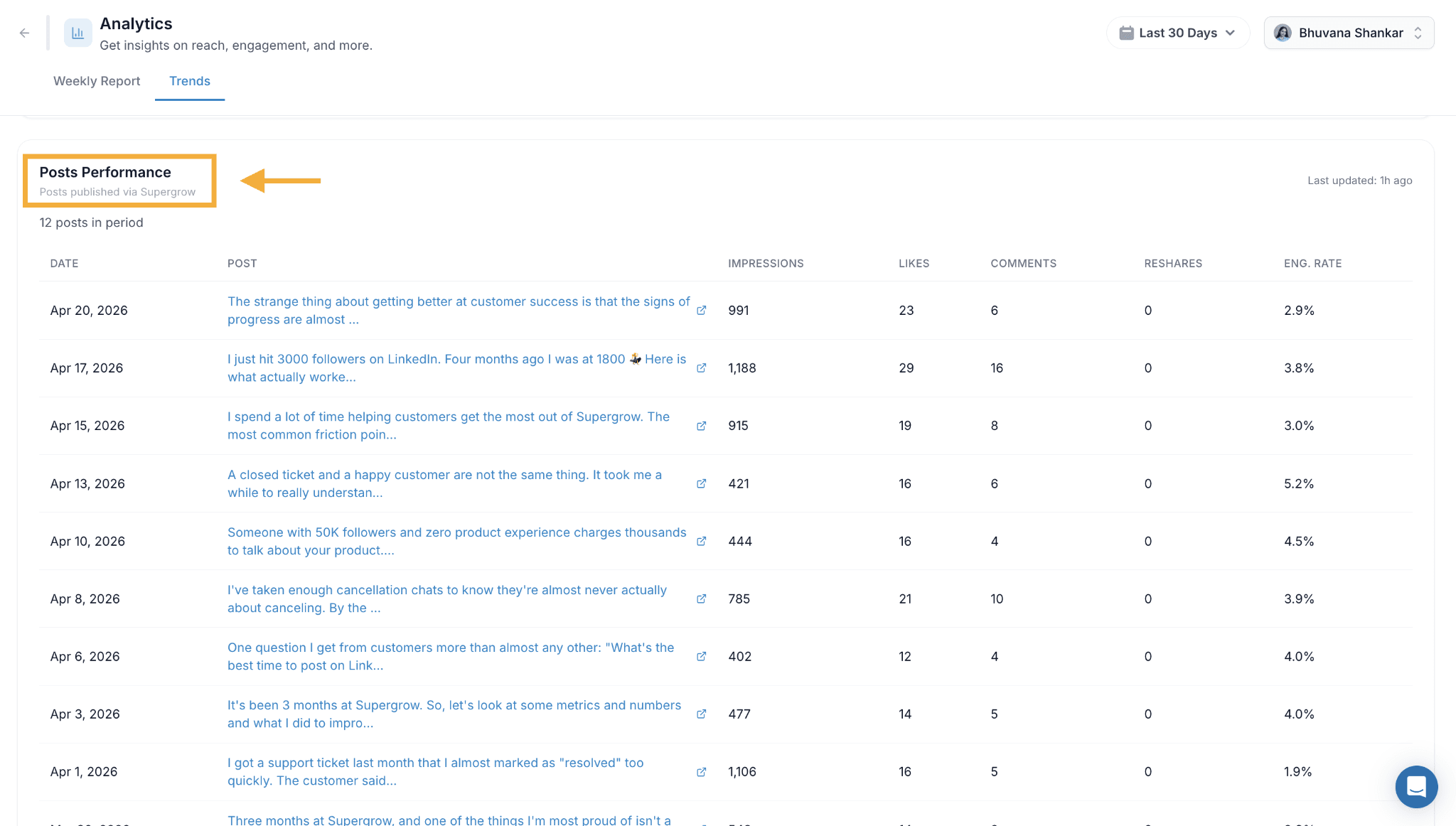
For individuals, Supergrow's Posts Performance view shows every post published during a given period, along with impressions, likes, comments, reshares, and engagement rate, in a single table.
The pattern becomes visible immediately: which posts are pulling 1,000+ impressions, which are falling below 500, and whether engagement rate is moving in the right direction regardless of raw impression volume.
That is the data that informs what to write next. Not the raw number from a single post, but the trend across all of them.
Impressions Are the Foundation. Everything Else Follows.
Before engagement, before followers, before inbound leads, someone has to see the content first. That is what impressions measure. Not vanity. Not validation. The starting point of everything that happens next on LinkedIn.
The professionals who grow consistently on LinkedIn are not the ones obsessing over a single post's number. They are the ones who understand how the algorithm distributes content, which signals it prioritizes, and which formats work for which audience sizes to build a system around that understanding.
Supergrow is built for exactly that. Create content in your voice. Schedule it at the right windows. Track what is working — individually and across your team.