LinkedIn Post Scheduler

Generate, schedule, and publish.One workflow.

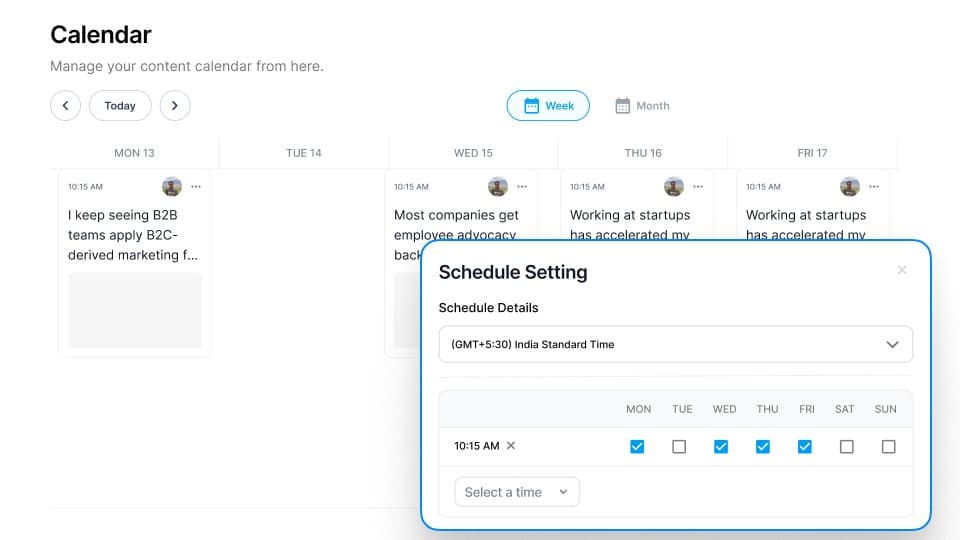
Visual calendar, smart queue, and first-comment scheduling built into the same LinkedIn scheduling tool where you create.

7-day free trial · 1,200+ professionals
3.5×more reach with consistent weekly posting
50,000+posts scheduled through Supergrow
2 minto schedule a full week of content
Why Consistency Wins

The accounts that grow never miss a week.

The LinkedIn algorithm rewards one thing above all: consistency. A LinkedIn post scheduler that keeps your calendar full is the highest-leverage investment you can make.

3.5×
more reach for profiles that post 3+ times per week
Source: LinkedIn, 2024
120%
higher deal sizes when buyers follow an executive
Source: LinkedIn B2B Institute
8 wks
average time for consistent posting to compound into visible growth
62%
of B2B buyers check a seller's LinkedIn before taking a meeting
Features

Three views. One LinkedIn scheduling tool.

See your entire week at a glance.

A drag-and-drop weekly calendar that shows every scheduled post, best-time slots, and gaps you need to fill. No more guessing what's going out when.

Drag-and-drop rescheduling
Best-time indicators per day
Week, month, and list views
2.4×more click-throughs with a scheduled first comment

Every post gets a CTA. Without you lifting a finger.

Schedule a first comment to go live the moment your post publishes. No manual follow-up needed.

Auto-publishes with your post
Add links, questions, or CTAs
2.4x more click-throughs on average
Start scheduling free
The Workflow

From idea to published in one connected system.

Most tools handle one step. This LinkedIn scheduler connects all five so nothing falls through the cracks and your content ships on time, every time.

Step 01
Create
Use Postcast or the AI editor to generate posts in your authentic voice.
Step 02
Refine
Edit tone, length, and format. Add a first comment. Preview how it looks on LinkedIn.
Step 03
Review
For teams: route posts through an approval workflow before they go live.
Step 04
Schedule
Pick a date and time, or drop it in the smart queue. Supergrow handles the rest.
Step 05
Track
See impressions, engagement, and follower growth tied to every post you publish.
For Teams

One dashboard for every voice in your company.

When multiple people post on behalf of your brand, you need visibility and control. Supergrow's LinkedIn scheduling tool gives marketing teams both.

Multi-account scheduling
Manage and schedule content for 5, 10, or 50 LinkedIn accounts from one dashboard.
Approval workflows
Route posts through manager review before they go live. No more rogue publishing.
Unified team calendar
See every team member's scheduled content in a single calendar view. Spot gaps instantly.
Brand governance
Set tone guidelines and content guardrails so every post stays on-brand.
Explore for Teams

What users of our LinkedIn post scheduler are saying.

"I went from posting once a month to 3× a week. Two inbound deals last quarter came directly from LinkedIn."

Marck Thiel
Project Manager

"The scheduling calendar is the reason I stick with Supergrow. I batch-write on Monday, and content goes out all week."

Sarah K.
Marketing Director

"First comment scheduling alone saves me 10 minutes per post. Over a month that adds up."

Patrick Cumming
Director of Marketing, KlientBoost

"We activated 10 team members. The approval workflow keeps everything on-brand without slowing us down."

Andy Lambert
Advisor

"I used to forget to post by Wednesday. Now my queue handles everything. Consistency finally clicked."

Paul Souder
Marketing PM, Friendship Industries

"I went from posting once a month to 3× a week. Two inbound deals last quarter came directly from LinkedIn."

Marck Thiel
Project Manager

"The scheduling calendar is the reason I stick with Supergrow. I batch-write on Monday, and content goes out all week."

Sarah K.
Marketing Director

"First comment scheduling alone saves me 10 minutes per post. Over a month that adds up."

Patrick Cumming
Director of Marketing, KlientBoost

"We activated 10 team members. The approval workflow keeps everything on-brand without slowing us down."

Andy Lambert
Advisor

"I used to forget to post by Wednesday. Now my queue handles everything. Consistency finally clicked."

Paul Souder
Marketing PM, Friendship Industries

Frequently asked questions

Write or generate a post, pick a date and time (or drop it in your queue), and Supergrow publishes it directly to LinkedIn. You can also schedule a first comment to go live at the same time.
Yes, it's built in. When you schedule a post, there's a field to write a first comment. It publishes automatically the moment your post goes live. No manual follow-up needed.
The calendar gives you a visual weekly/monthly overview. The smart queue lets you define recurring time slots and drop posts in order. The Kanban pipeline tracks post status from draft to published. Use whichever fits your workflow, or all three.
Yes. You can schedule content for multiple team members, route posts through approval workflows, and see everyone's calendar in one unified view. Great for marketing teams running employee advocacy programs.
Supergrow is purpose-built for LinkedIn. Every feature, from Content DNA to the first comment scheduler, is designed specifically for how LinkedIn's algorithm and audience work.
Drag and drop it to a new slot in the calendar, or change the date/time in the editor. If it's in the queue, just reorder it. Changes take effect immediately.
No hard limit. Schedule as far ahead as you want. Most users batch a week or two at a time, but you can queue a month's worth of content if that's your style.
Most schedulers only handle posting. Supergrow is a complete LinkedIn scheduling tool that also generates content in your voice, manages team approvals, and tracks performance. Create, schedule, publish, and measure from one workspace.

Stop stitching together a workflow.

Start using one that's already built.

The only LinkedIn post scheduler that creates, schedules, publishes, and tracks from one workspace. Free for 7 days.

Start scheduling free
7-day free trial · Cancel anytime