Team Analytics

LinkedIn® Team Analytics for Your Employee Advocacy Program

One dashboard. Every member. Full visibility into who's posting, what's landing, and where the program is stalling.

Start free trial
★★★★★Rated 4.9/5 on G2
7-day free trial · Cancel anytime
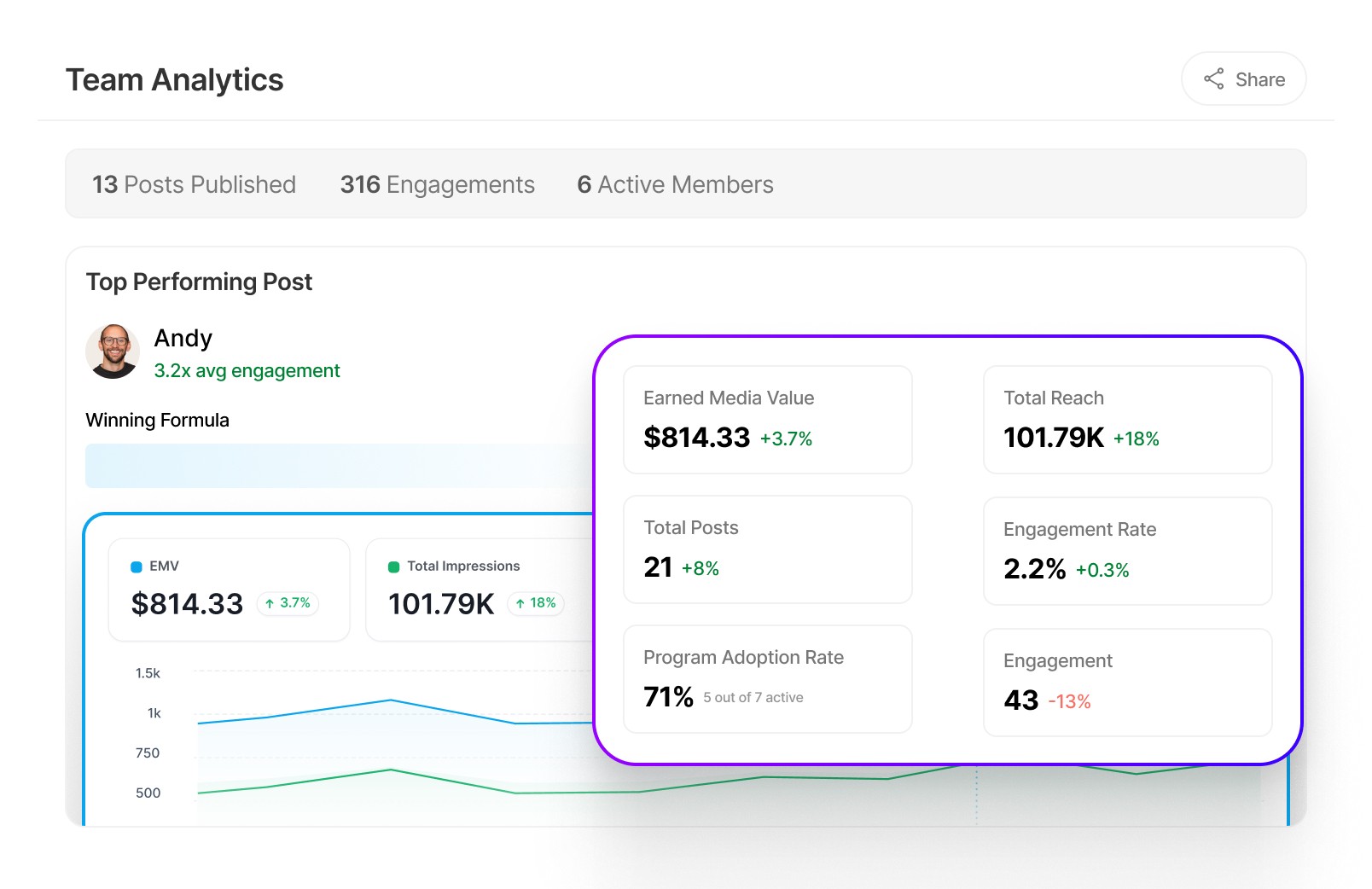
Team Analytics dashboard

Trusted by leading B2B companies

Brevo logo
Atlas Cloud logo
Bindbee logo
FF&A logo
Activity Stream logo
Sage logo
Join logo
120%
higher deal sizes when buyers follow your executives on LinkedIn®
LinkedIn® B2B Institute
3 in 4
B2B decision-makers trust thought leadership over product sheets
LinkedIn® x Edelman, 2024
95%
of hidden buyers are more open to outreach after strong thought leadership
LinkedIn®, 2025
Employee Advocacy Team Analytics

What is employee advocacy team analytics?

Employee advocacy team analytics is the reporting layer that turns your LinkedIn employee advocacy programme from a feeling into a measurable business channel. Without it, marketing managers rely on manual LinkedIn exports, DMs to executives asking 'did you post this week?', and gut feel to justify the investment to leadership.

Real-time team visibility
Every member's posting frequency, impressions, and engagement rate in one dashboard, updated automatically. No spreadsheets, no chasing.
Weekly report, zero prep
An auto-generated digest lands every Monday: team summary, top post, and AI insight. Delivered to Slack or email, no login needed.
Leadership-ready in two clicks
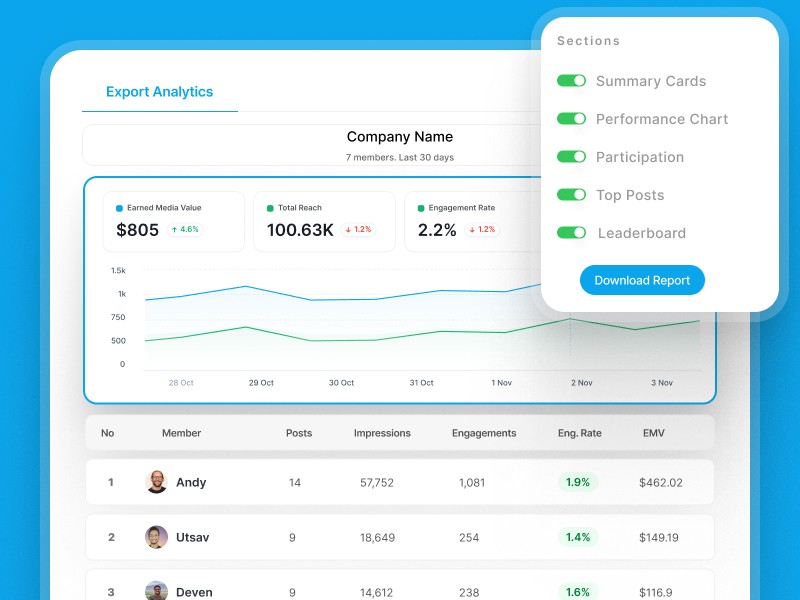
Share a live report link or export a branded PDF. No login required for stakeholders. No manual formatting, no lost Fridays.
more consistent posting frequency across teams using analytics
4 hrs
saved per week on manual reporting and data wrangling
< 5 min
from team setup to first live report, no integrations needed
Supergrow customer data
How It Works

Up and running in minutes.

No setup. No integrations. No data wrangling. Connect your team and the data starts flowing.

01

Invite your team

Add all your team members in one account and collaborate effectively.

02

Everyone starts posting

Your team creates and publishes content through Supergrow.

03

See the full picture

All your team data at one place. See the full picture and improve your strategy.

04

Share with leadership

Export a clean PDF or share a live report link in seconds.

"Before Supergrow, I had no idea which executives were actually posting. Now I can see everything, share it with my CMO, and act on it the same day."

Kelly Wiarda
Kelly Wiarda
Head of Marketing, Grand Ventures

Three views that change how you manage the program

Built for the person responsible, not just the people posting

1
Team Overview

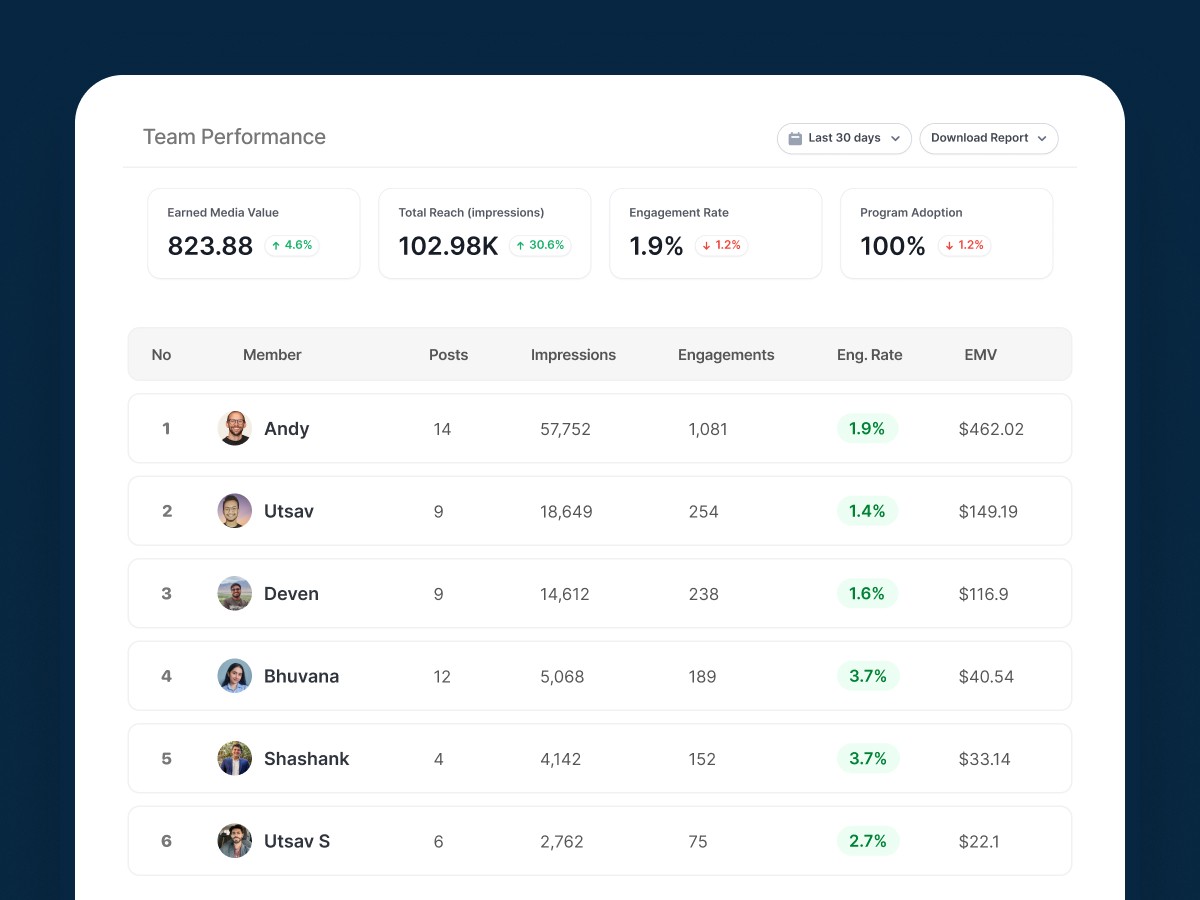
See your whole team at a glance

One dashboard shows impressions, posts, and engagement rates across every member. Filter by date range or individual. No toggling between tools.

Combined and per-member view in one place
Date range filters: 7d / 30d / 90d / custom
Period-over-period comparison built in
2
Weekly Report

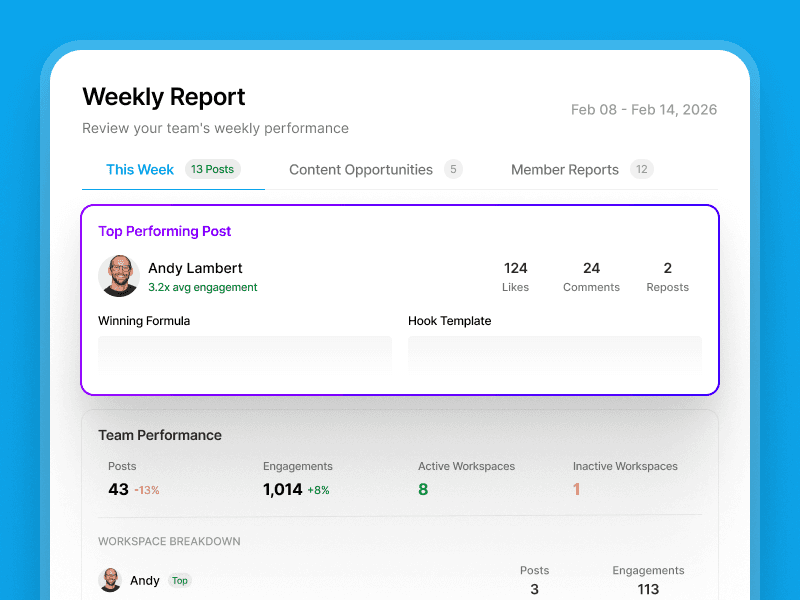
Every Monday: what worked, and what to do next

A ready-made weekly digest lands automatically. Team summary, top performing post, and an AI insight on what to create next. No prep required.

Auto-generated every Monday morning
Top post, team summary, and AI content suggestion
Delivered to Slack or email. No login needed
3
Instant Reporting

Report to leadership in two clicks

Export a clean PDF summary or share a live report link. No login required for viewers. Turn a full day of manual work into a two-minute task.
One-click PDF export with branded cover
Shareable live link for stakeholders
Scheduled reports coming soon
Team Overview
Weekly Report
Instant Reporting

What does Supergrow's team analytics measure?

Every metric that matters to your program, organized in one place and delivered where your team already works
Slack Integration

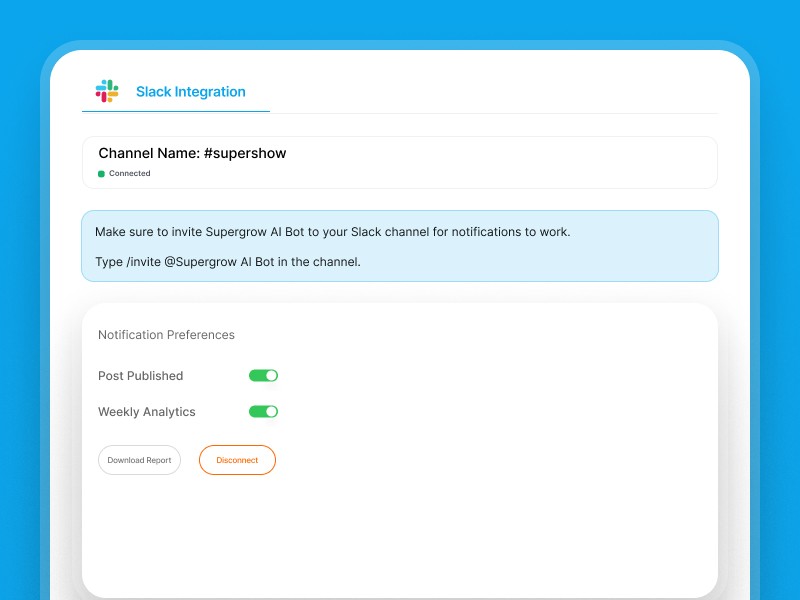
Weekly insights, where your team already is

Push your weekly report straight to Slack. Leadership sees the numbers without logging in.

Supergrow weekly team analytics report delivered to Slack channel
Top 3 Posts

Know exactly what's resonating

See the top three posts by engagement across the whole team. Spot what formats and topics drive results.

Top 3 performing LinkedIn posts by engagement across the team
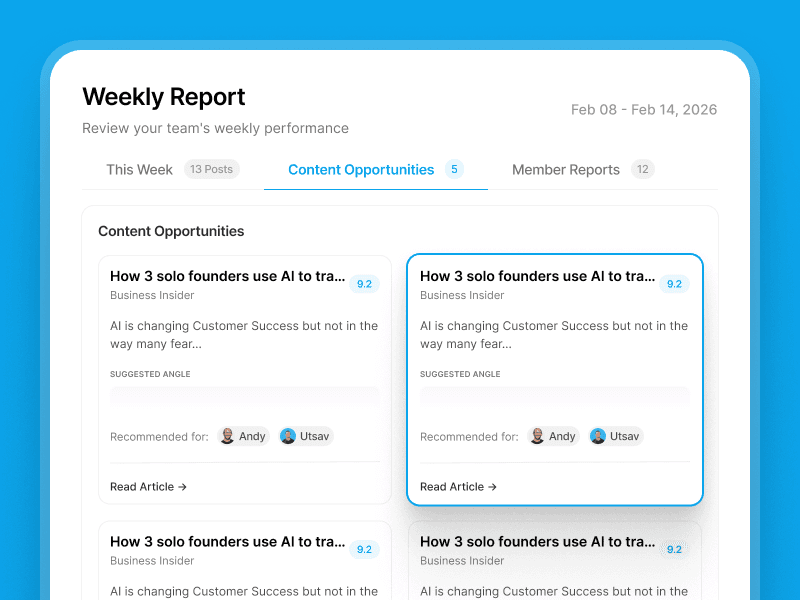
Content Opportunities

Never run out of things to post

AI-surfaced content ideas based on what's already working. Turn patterns into a repeatable content engine.

AI-surfaced content opportunities based on top-performing posts
Member Level Reports

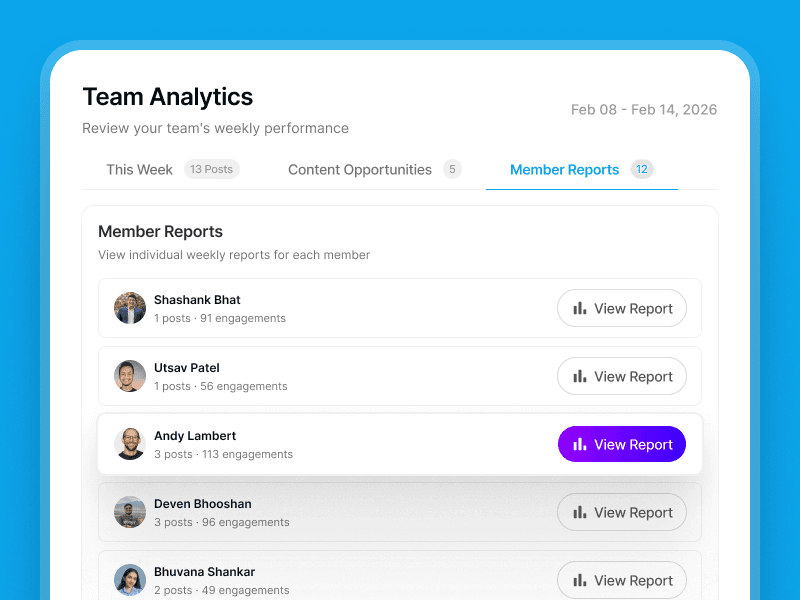
Individual performance, without the spreadsheet

Drill into any member's impressions, engagement rate, and posting consistency. Spot who needs support early.

Individual team member LinkedIn analytics showing impressions and engagement rate

What marketing managers and leadership say

From teams of 3 to 200+, across B2B marketing and comms.

"I used to dread the monthly exec report. Pulling data from LinkedIn®, formatting it, making it presentable. It ate my Fridays. Now I send it in two clicks. My CMO actually reads it."

Patrick Cumming
Patrick Cumming
Marketing Agency · 11 team members

"I finally had something concrete to bring to our board. Which executives were posting, what topics were landing, how engagement tracked against pipeline. Thought leadership stopped being a gut-feel investment."

Tripti Chadda
Tripti Chadda
Professional Services · 9 team members

"We went from zero visibility into our program to a weekly report I actually look forward to sharing. Leadership now sees thought leadership as a real channel, not just a nice-to-have."

Paul Souder
Paul Souder
Packaging Company · 8 team members

Frequently asked questions about LinkedIn team analytics

Still have questions? Reach out to us.

Yes. Each member needs a Supergrow seat to connect their account. Their performance is then visible in your team dashboard. No extra steps needed from them.

Yes. Your team's posting activity and performance is visible in one dashboard from the moment you set up Team Analytics. You can view combined metrics across all members, including total impressions, average engagement rate, and posting frequency for the period, or drill down into any individual to see exactly which posts landed and which missed. Date range filters let you compare 7-day, 30-day, or 90-day windows, or set a custom range for a specific campaign or quarter. The dashboard updates automatically as your team posts, so you are always looking at current data rather than a snapshot from last week's manual export. Managers use the individual drill-down to spot members going quiet early and act before momentum is lost. You can also share a live report link or export a PDF directly from the same view.

Every Monday morning, Supergrow automatically generates a weekly digest covering the previous seven days of your team's activity. The report includes a team-level summary of total impressions and engagement rate, a spotlight on the top-performing post across the programme, and an AI-generated insight on what content format or topic to prioritise next week. You can configure delivery as a Slack message to a channel of your choice, as an email to one or more recipients, or both. The report is also available as a PDF export on demand, which is useful when you need a clean, branded summary for a CMO presentation, a board update, or a quarterly business review. You choose the delivery method in your team settings and can update it at any time. The report goes out automatically every week — no manual sending required, even when other priorities take over.

Yes. You can generate a shareable live report link for any stakeholder, whether that is your CMO, a board member, a client, or a department head, without requiring them to create a Supergrow account. The link opens a read-only view of your team analytics showing current impressions, engagement rates, top posts, and posting activity across all members. The data updates automatically, so every time your stakeholder opens the link they see the latest numbers without you needing to re-export or resend anything. You control access and links can be revoked at any time from your team settings. This is particularly useful for board reporting, monthly leadership reviews, and agency clients who need visibility into programme performance without needing full platform access. Anyone with the link can view the report in their browser without signing in, and it works on any device.

Engagement rate is calculated as (likes + comments + reposts) divided by impressions, averaged across all posts in the selected date range, per member and for the team overall.

No minimum. Team Analytics works for programs of 2 members and scales to 200+. Pricing is per seat. You only pay for the members you add.

Your team is posting. Now prove it's working.

Start your free trial and have your team analytics live before end of day.

Start free trial
7-day free trial · Cancel anytime

Turn expert thinking into strategic LinkedIn® visibility that drives influence and revenue.

© 2026 Supergrow. All rights reserved.

LinkedIn is the registered trademark of LinkedIn Corporation or its affiliates. The use of the LinkedIn trademark in connection with this product does not signify any affiliation with or endorsement by LinkedIn Corporation or its affiliates.